
 SFTPPlus
Administrators#
Administrators are dedicated to accessing the Web Manager administration service. They cannot be used for file transfer operations.
To simplify configuration management for a large number of administrators, the administrators are associated with one or more roles.
This allows, for example, to easily disable access for all administrators associated with a particular role by simply disabling the role instead of having to disable every administrator.
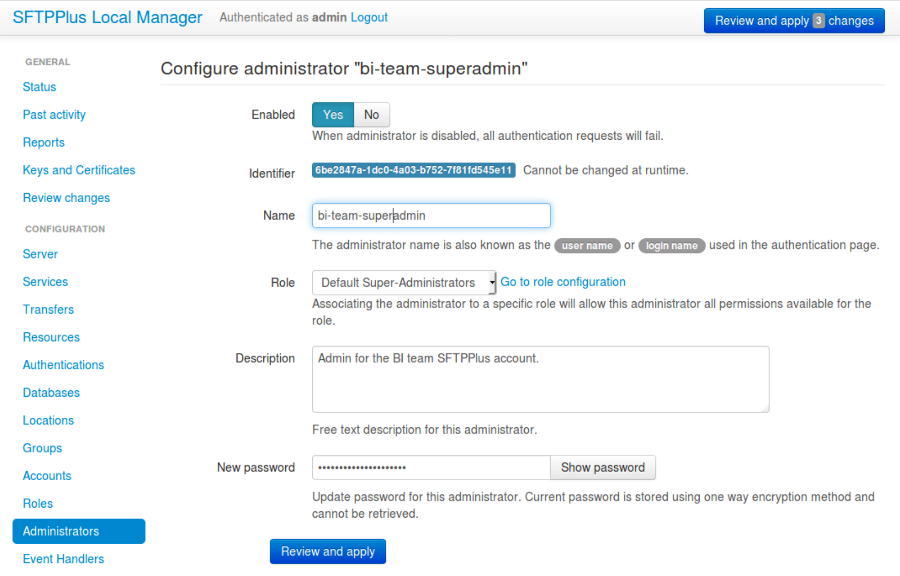
Adding a new administrator via Web Manager#
Administrators can be added or changed via Web Manager below.
Adding a new administrator via text configuration#
Adding a new administrator is done by creating a new section inside the configuration file.
The name of the section should be prefixed with administrators/ and followed by the administrator's UUID.
The administrator's UUID can be any unique string used to identify the administrator. Once defined, the UUID should not be changed.
For more information, please see the dedicated UUID documentation.
An administrator can be an application-level account defined for accessing the Web Manager or a local operating system account belonging to an operating system group associated with a role.
For example, to add a new administrator named sa-admin:
[administrators/804aab78-70c0-4e1d-8480-4979e169a0a2]
name = sa-admin
enabled = Yes
description = Administrator account for our super admin.
password = $5$rounds=1000$utwEAUxeFBXSF0Uf$klQTAMRygQfijPXMYZCddVug
role = 404aab78-70c0-4e1d-8480-4979e169a0a4
Note
The server does not support authenticating operating system administrators that are used for multiple roles. In this case, the result is undefined.
Note
Administrator names and passwords longer than 150 characters are not allowed by SFTPPlus. Generating passwords longer than 128 characters is not possible either. These restrictions prevent denial of service attacks.
Reset password#
The Web Manager is a web-based administration interface access-protected through username and password credentials.
During initial installation you are asked to define a username and a corresponding password for the default administration account.
If you forget the username or password of the default administration account, this section describes how to reset it.
Passwords used by SFTPPlus are stored in a protected format based on a one-way hash function. Recovering a password from this protected format is not possible. The only option is to generate a new protected password to replace the existing one.
To generate a new protected password, use the following command:
admin-commands generate-password
Enter password   (not echoed):
Confirm password (not echoed):
$5$rounds=80000$iv74TLS39uaogCZA$CfnjEwnGjAOGCnMcC5bD2gK.
Stop the SFTPPlus service, and modify the configuration/server.ini file so that the [administrators/DEFAULT-ADMINISTRATOR-UUID] section has the password generated from the previous step:
[administrators/DEFAULT-ADMINISTRATOR-UUID]
enabled = Yes
name = YOUR-ADMIN-USERNAME
password = $5$rounds=80000$iv74TLS39uaogCZA$CfnjEwnGjAOGCnMcC5bD2gK.

role = DEFAULT-ROLE
Once the modified configuration file is saved, you can start the SFTPPlus service. You can then login to the Web Manager web page using the new credentials.
enabled#
- Default value:
Yes
- Optional:
Yes
- From version:
2.1.0
- Values:
Yes
No
- Description:
This option specifies whether or not to enable access for this administrator.
name#
- Default value:
''
- Optional:
No
- From version:
2.1.0
- Values:
Any alphanumeric string including space, _ or -.
- Description:
Human-readable short string used to identify this administrator.
It also represents the
loginorusernamevalue for this administrator.
description#
- Default value:
''
- Optional:
Yes
- From version:
2.1.0
- Values:
Any character string.
- Description:
Human-readable text that identifies the person or entity to use this administrator account and/or describes the account's purpose.
Example:
[administrators/92ad5b32-d8d7-4ed8-94e1-dbb9f01383f4]
description = Administrator from the SA team.
             Contact: someone@email.tld
name = sa-operator
theme#
- Default value:
light
- Optional:
Yes
- From version:
6.0.0
- Values:
light
dark
- Description:
The administrator's preferred Web Manager color theme. Values are case insensitive. Any value other than dark is displayed using the light theme.
After login, the Web Manager automatically switches to this theme and updates the browser's local preference. Changing the theme with the theme switcher saves the new value after 15 seconds without further changes.
The browser continues to remember the theme locally, including on the login page. This configuration option takes precedence over the browser's selection after login.
Saving requires permission to read and update this administrator's theme option.
Note
External administrators use the theme supplied by their authentication source, defaulting to light when no theme is supplied. Values follow the same case-insensitive policy, with unsupported values displayed using the light theme. Theme changes made in the Web Manager for these administrators are stored only in the browser.
password#
- Default value:
Empty
- Optional:
Yes
- From version:
2.1.0
- Values:
Password encrypted using a one-way cryptographic hash function.
Empty.
- Description:
This option specifies the password used for validating the credentials for this administrator.
It is stored encrypted using the cryptographic hash function SHA-256.
To get the hashed password please check how to generate encrypted passwords using admin-commands.
When the password is left empty, the administrator will not be able to authenticate, even if the enabled option is set to yes.
source_ip_filter#
- Default value:
Empty
- Optional:
Yes
- From version:
4.14.0
- Values:
IP address access control rules
CIDR range access control rules
Country code access control rules
ASN access control rules
Empty
- Description:
Restricts the source IP addresses from which this administrator can authenticate. Leave empty to rely on the associated role filters. A nonempty filter denies unmatched addresses; role association checks still apply.
See source IP filtering for rule syntax, evaluation behavior, and examples.
multi_factor_authentication#
- Default value:
Empty
- Optional:
Yes
- From version:
4.0.0
- Values:
OTP Authentication URL
Empty.
- Description:
This option specifies the One-Time Password shared secret associated with this administrator, stored as an otpauth:// URL, as defined by the Google Authenticator
More information on 2-step authentication is available on the cryptography guide page.
roles#
- Default value:
DEFAULT-ROLE
- Optional:
No
- From version:
4.16.0
- Values:
UUID of a role.
Comma-separated UUID of roles
- Description:
This option defines the roles associated with this administrator.
It can be configured with one or multiple role UUIDs.
The first UUID is the primary role of this administrator.
Updating this configuration doesn't impact the sessions of already authenticated administrators, which continue to use the old configuration value. The new value is only used for new authentications.
node_variables#
- Default value:
Empty
- Optional:
Yes
- From version:
2.26.0
- Values:
INI text
- Description:
This is designed to be used when this administrator is used to synchronize the configuration to a remote node.
The value from here is used to overwrite any configuration when applied to the remote node.