
 SFTPPlus
Groups#
Introduction#
Group configuration options are modified in a similar way to any account configuration option.
Group configurations are not forced upon accounts belonging to the group. Group configurations are optional, they are used to specify the actual values for account configuration options set as Inherit.
The only exception of forced configuration is the enabled option. When a group is disabled, all accounts will be disabled.
Accounts can overwrite group configuration at any time by defining a value other than Inherit.
There are few differences in changing groups configuration, and they are described on this page.
Default group#
The configuration file must define the following group: DEFAULT_GROUP.
Besides acting like any other group and allowing association with any account, the DEFAULT_GROUP is also automatically associated to all application or operating system accounts for which a group was not explicitly configured.
The default group cannot be renamed and it has the special UUID and name DEFAULT_GROUP.
Here is an example configuration for DEFAULT_GROUP:
[groups/DEFAULT_GROUP]
enabled = Yes
description = Default group for all accounts.
lock_in_home_folder = Yes
home_folder_path = c:\partners\${USER}
create_home_folder = No
create_home_folder_owner = ${DEFAULT_OS_USER}
create_home_folder_group = ${DEFAULT_OS_GROUP}
allow_certificate_authentication = No
Adding a new group via Web Manager#
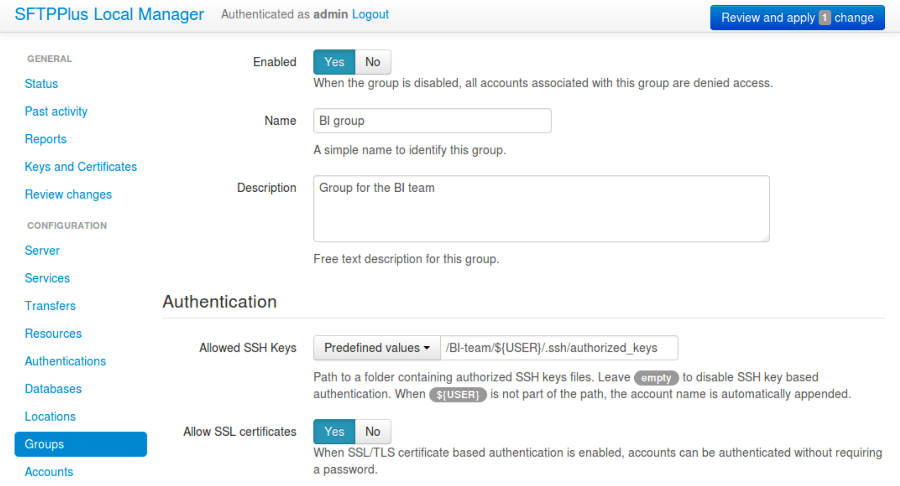
A new group can be added or changed via Web Manager below.
Adding a new group via text configuration#
Adding a new group is done by creating a new section inside the
configuration file. The name of the section should be prefixed by groups/
and followed by the group's UUID.
The group's UUID can be any unique string used to identify the group. Once defined, the UUID should not be changed.
For more information about UUIDs, please see the dedicated UUID documentation.
As another example, to add a new group named partners see below:
[groups/804aab78-70c0-4e1d-8480-4979e169a0a2]
name = partners
enabled = Yes
description = Group dedicated for partners accounts.
home_folder_path = /BASE/FOLDER/FOR/PARTNERS
home_folder_structure =
    /pull
    /pull/invoices
    /push
    /push/orders
default_permissions = allow-read, allow-write
path_permissions =
    *.pdf, allow-read
    *.csv, allow-write
virtual_folders =
    /team, d:\storage\sales-team
    /division, d:\storage\EMEA
Mapping SFTPPlus groups to external groups#
SFTPPlus groups can be mapped to external identity groups from LDAP, Active Directory, Entra ID, Google Identity, or Okta.
This mapping is configured using each group's external_groups_association option.
For LDAP and Active Directory authentication, SFTPPlus compares configured values against LDAP memberOf and tokenGroups values returned for the authenticated user. If any configured value matches a returned LDAP value, the account is associated with the SFTPPlus group. You can configure multiple LDAP values, one value per line, and you can mix LDAP DN values and Active Directory SID values.
For cloud authentication methods, SFTPPlus compares configured values against cloud group names and, when available, cloud group unique IDs.
For cloud authentication methods, SFTPPlus can also map groups implicitly when the SFTPPlus group name is the same as the cloud group name. When external_groups_association defines a match, that explicit association takes priority and implicit name mapping is ignored for that cloud group. This implicit mapping is not available for LDAP or Active Directory.
Each configured value can map to only one SFTPPlus group. Values are matched case-insensitive.
Warning
When users are authenticated from multiple identity sources, such as Active Directory and Entra ID, use cloud group unique IDs instead of cloud group names. IDs reduce ambiguity when names overlap across providers.
Warning
Mapping values are matched case-insensitive. Make sure your LDAP or Active Directory setup does not rely on case-sensitive values that differ only by letter case.
Configuration options#
Below you can find all the configuration options available for groups.
name#
- Default value:
''
- Optional:
No
- From version:
2.0.0
- Values:
Any text.
- Description:
Human-readable short string used to identify this group.
enabled#
- Default value:
Yes
- Optional:
Yes
- From version:
1.8
- Values:
Yes
No
- Description:
This option specifies whether or not to disable all accounts that are associated with this group.
When set to No, all accounts from this group will be disabled and authentication will fail for these accounts.
description#
- Default value:
''
- Optional:
Yes
- From version:
1.7
- Values:
Any character string.
- Description:
This is a free form text for attaching notes or a description to this group.
Example:
[groups/92ad5b32-d8d7-4ed8-94e1-dbb9f01383f4]
name = OS file transfer
description = OS accounts with access to the file server.
home_folder_path#
- Default value:
Empty
- Optional:
Yes
- From version:
1.6
- Values:
A path to a folder located in the local file system.
/some/path/${USER}/ftp-pub
${SHARED}/srv/accounting/
${OS_HOME}
Empty
- Description:
This option specifies the path to the base folder, where the files for this group's accounts are stored. The home folder is used as the initial current folder for new connections.
It may contain the ${USER} placeholder which will be replaced with the user's name for each account.
If the defined path value does not contain the ${USER} placeholder, the placeholder is automatically appended to the end of the path. In this way all users from the group will have different home folders. This is why
c:\\Usershas the same effect asc:\\Users\\${USER}The ${SHARED} marker can be used when all the accounts from this group should inherit the same path, without having the username appended to the path.
For example, if you want to have all the users from a group to have the same home folder path as
c:\\FTP-Pub\\Inboxyou can set the following configuration option below:[groups/92ad5b32-d8d7-4ed8-94e1-dbb9f01383f4] home_folder_path = ${SHARED}C:\FTP-Pub\Inbox
As another example, the ${OS_HOME} can be used as a placeholder for the user's home folder path provided by the operating system:
[groups/92ad5b32-d8d7-4ed8-94e1-dbb9f01383f4]
home_folder_path = ${OS_HOME}
When the option is left empty it will require each account associated with the group to define its home folder path.
When defined, it should be defined as an absolute path.
On Windows:
c:\\Users\\${USER}\\reportswill be mapped asc:\\Users\\some_user\\reportsfor the account namedsome_user.On Unix-like systems:
/home/${USER}/reportswill be mapped as/home/some_user/reportsfor the account namedsome_user.Note
When using the ${USER} placeholder, usernames containing the following characters will have them replaced with the dot (.) character. The following characters are escaped:
\ / : * ? " < > |When defining the
home_folder_pathfor a group, the accounts belonging to it should use the Inherit value, otherwise, the group values will not be applied. For a better understanding, please follow the explanations and examples on properties inheritance.Note
For domain accounts, the server cannot automatically create missing Windows home folders, also known as user profiles. Because of this, you cannot use the ${OS_HOME} placeholder when configuring the home_folder_path for a domain account.
For domain accounts, a regular folder can be set as home_folder_path. The folder can be automatically created, just as for regular accounts.
external_groups_association#
- Default value:
empty
- Optional:
Yes
- From version:
5.25.0
- Values:
Text value, one value per line.
LDAP DN value.
Active Directory SID value.
Cloud group name value.
Cloud group unique ID value.
- Description:
This defined the names or IDs of external groups that are associated with this SFTPPlus group.
The values are case-insensitive. Check the dedicated section above for more details.
Before version 5.25.0 this was named ldap_association.
lock_in_home_folder#
- Default value:
Yes
- Optional:
Yes
- From version:
1.6
- Values:
Yes
No
- Description:
This option enables you to decide whether the accounts belonging to this group are allowed access outside the home folder or not. This is only valid for operating system accounts, as application accounts are always locked in home folder.
create_home_folder#
- Default value:
No
- Optional:
Yes
- From version:
1.6.0
- Values:
Yes
No
- Description:
This option specifies whether or not the server should create the home folders for the accounts associated to this group as the primary group, in the case that they are missing.
If this option is set to No the server will deny access to users for which the home folder is not already created. When set to Yes the server will try to create missing home folders for users that have been successfully authenticated.
When set to Yes, and this is a primary group, it will also try to create the missing path for any virtual folder that is defined using the ${USER} placeholder.
create_home_folder_owner#
- Default value:
${DEFAULT_OS_USER}
- Optional:
Yes
- From version:
1.6.0
- Values:
Name of an account defined inside the operating system,
${DEFAULT_OS_USER}.
- Description:
When the server is configured to automatically create missing home folders, this option specifies who the owner of the newly created folder should be.
When this value is set to ${DEFAULT_OS_USER}, the folder owner will be set to the default value specified by the operating system.
create_home_folder_group#
- Default value:
${DEFAULT_OS_GROUP}
- Optional:
Yes
- From version:
1.6.0
- Values:
A group defined by the operating system,
${DEFAULT_OS_GROUP}.
- Description:
When the server is configured to automatically create missing home folders, this option specifies what operating system group should be associated with the newly created folder.
When this value is set to ${DEFAULT_OS_GROUP}, the folder group owner will be set to the default value specified by the operating system.
Note
On Windows operating systems, ${DEFAULT_OS_GROUP} is defined as the
Usersgroup. Please contact us in the case that you need a different behaviour.
file_write_size#
- Default value:
0
- Optional:
Yes
- From version:
5.1.0
- Values:
Number of bytes
- Description:
Maximum size in bytes allow when writing / uploading data for a single file.
Set to 0, to disable any limit.
required_credentials#
- Default value:
any
- Optional:
Yes
- From version:
4.10.0
- Values:
password
ssh-key
password, ssh-key
any
- Description:
This defines the set of valid credentials required for authenticating this group of accounts.
Set it to password to authenticate an account once it provides a valid password.
Set it to ssh-key to authenticate an account once it provides a valid SSH key. The provided key is checked against all SSH keys from the configured list.
Set it to password, ssh-key to authenticate an account only if it provides both a valid password AND a valid SSH key.
Leave it empty or set it to any to authenticate the account once it provides any type of credentials, e.g. a valid password OR a valid SSH key.
ssh_hostbased_auth#
- Default value:
no
- Optional:
Yes
- From version:
5.20.0
- Values:
yes
no
- Description:
Whether to allow SSH host-based authentication (hostbased) as specified in RFC 4252 section 9, for users that have this group as the primary group.
The public key is validated using the same authorized keys as for the publickey authentication method.
The client host name and user name of the client host values are only used to validate the signature.
source_ip_filter#
- Default value:
Empty
- Optional:
Yes
- From version:
3.45.0
- Values:
IP address access control rules
CIDR range access control rules
Country code access control rules
ASN access control rules
Empty
- Description:
Controls whether this group is associated with a login from a given source IP. Leave empty to permit association from any source IP. A nonempty filter excludes unmatched addresses from this group. Authentication requires at least one group to remain associated.
See source IP filtering for rule syntax, evaluation behavior, and examples.
allow_certificate_authentication#
- Default value:
Yes
- Optional:
Yes
- From version:
1.8.1
- Values:
Yes
No
- Description:
Allow this group to authenticate using SSL certificates.
Certificates need to be issued using the same Common Name field (CN) as the account name.
If SSL certificate-based authentication is not enabled, accounts belonging to this group will have to use other means of authentication.
as2_require_http_authentication#
- Default value:
Yes
- Optional:
Yes
- From version:
4.9.0
- Values:
Yes
No
- Description:
This defines whether the AS2 partner is required to perform HTTP authentication together with the incoming AS2 message request.
Set it to No to allow receiving AS2 from non-authenticated HTTP connections. SFTPPlus will still validate the signature and encryption of the received AS2 message.
For increased security, we recommend setting this to Yes.
allow_own_password_change#
- Default value:
No
- Optional:
Yes
- From version:
3.43.0
- Values:
Yes
No
- Description:
Allow users of this group to change their own password.
The new password must meet the password policy requirements.
See Password updates and recovery for the differences between password changes and password recovery, and their configuration.
allow_password_recovery#
- Default value:
No
- Optional:
Yes
- From version:
6.1.0
- Values:
Yes
No
- Description:
Allow application accounts with this group as their primary group to recover a forgotten password by email. Additional groups do not grant this permission. This option is configured only on groups.
See Password updates and recovery for the requirements and configuration steps.
password_lifetime#
- Default value:
0
- Optional:
Yes
- From version:
3.46.0
- Values:
Number of days
- Description:
Number of days for which a password is valid.
Once a new password is set, it is valid for the configured number of days.
If the password is not changed for the configured number of days, the account is automatically disabled. To re-enable it, a new password needs to be set by an administrator.
Note
To allow users to change their own passwords, make sure allow_own_password_change is enabled.
disable_on_inactivity#
- Default value:
0
- Optional:
Yes
- From version:
4.32.0
- Values:
Number of days.
- Description:
Number of inactive days after which the accounts having this group as the primary group, are automatically disabled.
When set to 0, the accounts are never disabled.
Note
The condition under which the account is auto-disabled is also controlled by the account_auto_disable_grace_interval option, from the analytics resource. If the account was recently changed, it is not automatically disabled, even if there are no recent logins.
home_folder_structure#
- Default value:
Empty folder
- Optional:
Yes
- From version:
3.18.0
- Values:
path to a directory
List of directories, separated by newlines.
- Description:
A directory or a list of directories to be automatically created for accounts that were successfully authenticated and associated to this group.
For more details see the operation guide for using the home folder structure configuration.
default_permissions#
- Default value:
allow-full-control
- Optional:
Yes
- From version:
6.1.0
- Values:
Comma separated list of permissions
- Description:
Permissions used when no path rule matches the requested virtual path.
The following permissions are supported:
allow-full-control / deny-full-control
allow-read
allow-list
allow-create-folder
allow-traverse
allow-write
allow-rename
allow-delete-folder
allow-delete-file
allow-set-attributes
Separate multiple permissions with commas. For enforcement and inheritance details, see Server-side path permissions.
These permissions are inherited only when this is a primary group for the account, and the account is configured to inherit the default permissions.
path_permissions#
- Default value:
Empty
- Optional:
Yes
- From version:
6.1.0
- Values:
Path matching expression followed by comma separated permissions, one rule per line
Empty
- Description:
Each rule contains a glob or regular expression followed by at least one permission listed under default_permissions.
These permissions are applied to all accounts that are member of this group.
For path matching, group inheritance, and examples, see Server-side path permissions.
amend_write_name#
- Default value:
Empty
- Optional:
Yes
- From version:
3.30.0
- Values:
uuid-prefix
Empty
- Description:
This configuration allows the option to transparently amend the file name used during a file upload request.
Set it to uuid-prefix to have an UUID version 4 prefixed to the file name.
Leave it empty to not amend the file names for the upload requests.
ssh_delete_delay#
- Default value:
0
- Optional:
Yes
- From version:
4.23.0
- Values:
Number of seconds
- Description:
This allows configuring the SFTP server to delay the delete operation while reporting to the client that the operation was successful. The delete operation is executed with a delay and the success or error is recorded in the event logs.
This is designed to work around a compatibility issue with Azure Data Factory, in which Azure Data Factory SFTP connector requested the file to be deleted, before confirming that a previous download request was finalized.
Set it to 0 to not delay the delete operation and perform the delete operation right away, as requested by the client. This is the standard behaviour, and on errors, the SFTP client is informed of the error.
If this is not the primary group for an account, this configuration is ignored.
virtual_folders#
- Default value:
Empty
- Optional:
Yes
- From version:
3.35.0
- Values:
Comma-separated values defining the virtual path to real path mappings.
List of virtual path rules, one rule per line.
- Description:
By defining one or more virtual folders, you can allow access to selected files that are located outside an account's locked home folder.
This is a comma-separated list of values containing two elements: the virtual path and the real path.
The virtual path is always in Unix-like format (uses slash separators), and should be an absolute path, relative to the account's home folder.
The real path can be a Unix-like or Windows path and should be an absolute path to an existing folder on the local filesystem.
The virtual path and real path can contain the ${USER} placeholder (case-sensitive), which gets replaced with the name of each authenticated user. These paths are considered as being similar to the account's home folder path. This means that they can be automatically created if missing. (Since 4.22.0)
Below is an example of virtual paths defined for Windows:
virtual_folders =
    /invoices, D:\pull\invoices
    /teams/sales, E:\storage\teams\sales-share
Below is another example of virtual paths defined for Linux/Unix, containing a username placeholder:
virtual_folders =
    /${USER}, /srv/file-server/users/${USER}
    /support, /srv/file-server/support
    /infrastructure, /srv/file-server/infrastructure
For more details and examples on how to configure virtual folders, see the filesystem access documentation.